Lead Generation
How We Reduced Real Estate Seller Lead Cost From $87 to $18 Using an Intelligent Quiz Funnel
A Seller Readiness Quiz that takes up to 20 minutes cut a real estate agent's cost per seller lead from $87 to $18 and brought in 160+ seller leads in two months.

On this page
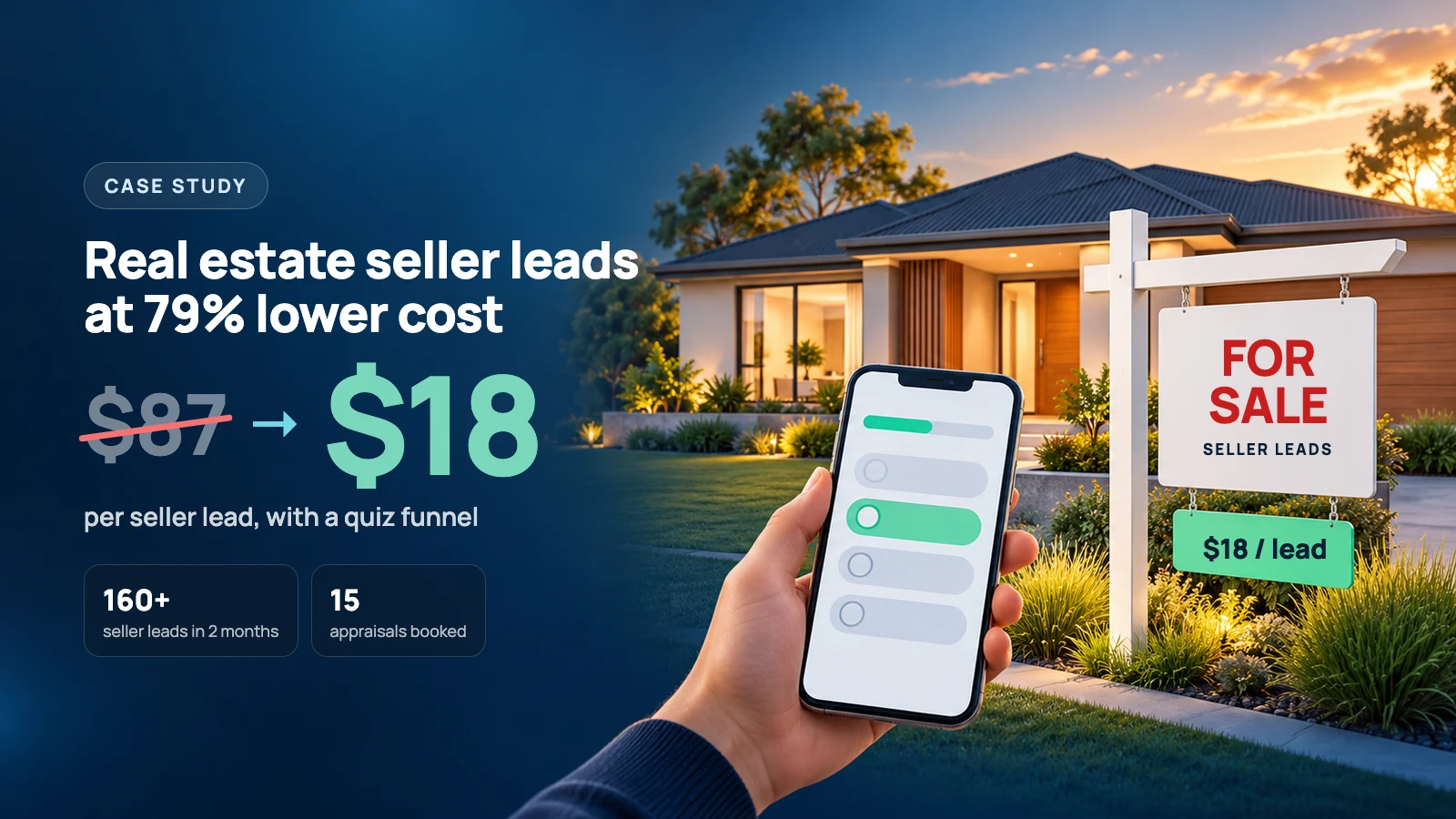
We reduced a real estate agent’s seller lead cost from $87 to $18 with a Seller Readiness Quiz.
In two months, the campaign brought in 160+ seller leads, and about 5% of landing page visitors completed the quiz.
But here’s the interesting part.
The quiz took homeowners anywhere from 2 to 20 minutes to finish. Depending on their selling timeline, they answered between 7 and 40 questions.
Most people make lead forms as short as possible. We did the opposite.
The client is a real estate agent in Australia with 20 years of experience. We built the first version of the quiz inside HighLevel, then moved it into our own quiz app. The results below cover both versions.
What results did the seller quiz get?
The campaign ran on Meta ads from August 26 to October 24, 2026. All figures are in US dollars.
| Metric | Result |
|---|---|
| Ad spend | About $2,900 |
| Seller leads | 160+ |
| Cost per lead | About $18 |
| Previous cost per lead (lead magnet campaign) | $87 |
| Landing page views | About 3,200 |
| Landing page conversion rate | About 5% |
| Appraisals booked so far | 15 |
| Traffic source | Meta ads |
| Quiz platform | HighLevel Survey Builder, then our own quiz app |
| CRM | HighLevel |
That’s about 79% less per lead than the agent’s previous lead magnet campaign.
These numbers cover the whole campaign, across both versions of the quiz. They came from the ads and the quiz working together. We didn’t run a controlled test, so we can’t say exactly how much of the drop came from the quiz alone.
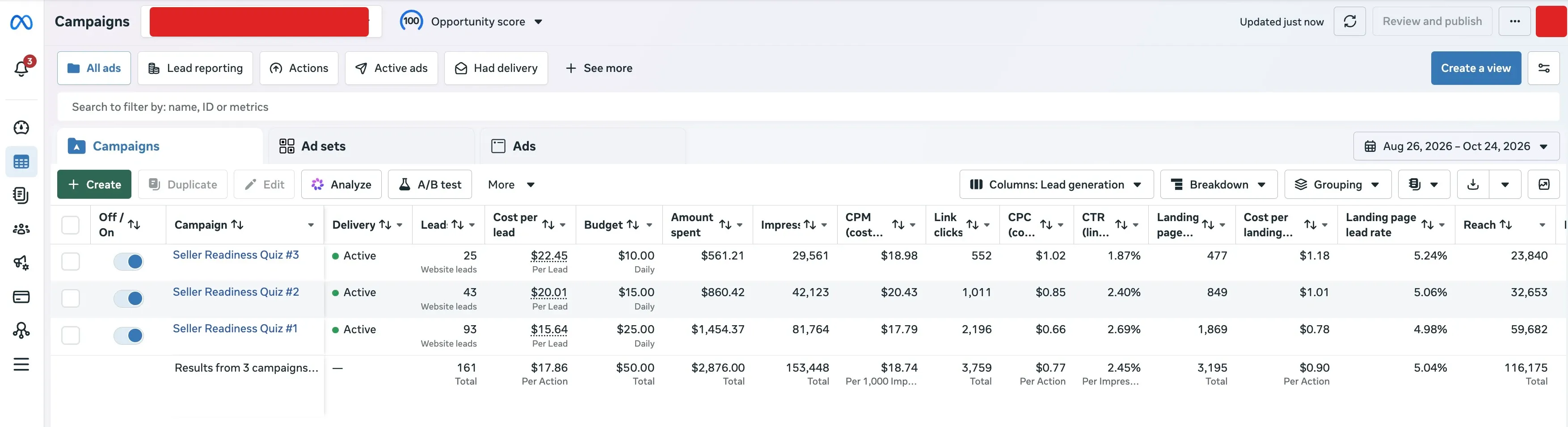 View full-size screenshot (opens in a new tab)
Meta Ads Manager, August 26 to October 24, 2026. Three quiz campaigns: 161 leads, $2,876 spent, $17.86 per lead, 5.04% landing page lead rate.
What problem was the agent trying to solve?
Getting leads wasn’t the hard part. Finding serious sellers was.
According to our client, when he meets a seller in person, he wins the listing about 95% of the time. So he didn’t need help in the meeting. He needed more conversations with homeowners who were actually planning to sell.
His previous campaign used a lead magnet. It brought in leads at $87 each, but many of them were only curious about their property’s value.
We wanted a system that would find serious sellers and give them something useful in return. That’s where the Seller Readiness Quiz came from.
How did the real estate quiz funnel work?
The system was simple:
Meta video ads > Seller Readiness Quiz > Personalized results > HighLevel CRM
Each part had one job:
- Meta video ads reached homeowners who might be thinking about selling.
- The quiz helped them understand their situation while collecting the details the agent needed.
- The results page gave them feedback based on their answers.
- HighLevel organized the leads so the agent could follow up.
The video ads brought the right people in. The quiz did most of the heavy lifting.
The video ads sold the quiz, not a form
We ran short talking head videos with captions.
They didn’t ask homeowners for their details. They focused on something most sellers don’t think about: you can lose money when you sell simply because you don’t know what to ask or what to look for.
The video then offered the Seller Readiness Quiz as a way to check where you stand.
The key was keeping the promise in the ad the same as the experience in the quiz. People who clicked got exactly what the video told them they’d get.
The questions came from 20 years of selling homes
The quiz was my idea. The questions came from my client.
We had several meetings to pick questions from his 20 years of experience. Each one made sellers think about something that affects their final sale price. Most homeowners had never considered these things.
So while they answered, they were learning something about their own situation. That’s why they kept going.
We split the quiz into five paths based on the homeowner’s timeline. The first question was:
“When are you planning to sell your property?”
- More than 6 months from now
- Within 3 to 6 months
- Within 1 to 3 months
- Ready to sell now
- Already on the market
Each answer opened a different set of questions. Someone planning to sell next year doesn’t need the same questions as someone whose home is already listed. Depending on the path, homeowners answered between 7 and 40 questions.
Even with that length, about 5% of landing page visitors finished the quiz and became leads.
Version one was built in HighLevel
We built the first version with HighLevel’s Survey Builder. Conditional logic showed each homeowner the questions for their timeline.
After the last question, homeowners entered their name, email, phone number and property address. Only then did they see their results.
That gave the agent detailed information about every homeowner before he picked up the phone.
Why did we spend so much time on the results page?
Imagine answering 30 questions about your home and your plans, then seeing this:
“Your score is 65%. Thank you for completing the quiz.”
You’d feel like you wasted your time. And that’s the homeowner’s first impression of the agent, before he’s even called.
So I wanted the results page to feel like a reward for their effort.
Different results for each selling stage. Every timeline got its own results page. Someone selling next year got feedback about preparing. Someone ready now got feedback about their current situation. The results felt like they were written for them, not like another generic lead form.
An animated score. I used custom code so the score fills in as an animated circle. It’s a small detail, but it makes the result feel earned instead of just printed.
Areas to improve. The page showed homeowners where their selling preparation could be stronger. Our campaign message was that better preparation could help protect 3% to 10% of a property’s sale value. That’s a potential opportunity, not a promised increase in price.
Results by email. Every homeowner also got an email with their results and guides that matched their score, so they had something to come back to.
All of this had one goal: build trust before the first phone call.
That matters because sellers prefer agents they already know. In the US, NAR’s 2025 Profile of Home Buyers and Sellers found that 66% of sellers chose an agent through a referral or one they’d worked with before. A cold lead doesn’t know you. A homeowner who has just received useful feedback from you is no longer a complete stranger.
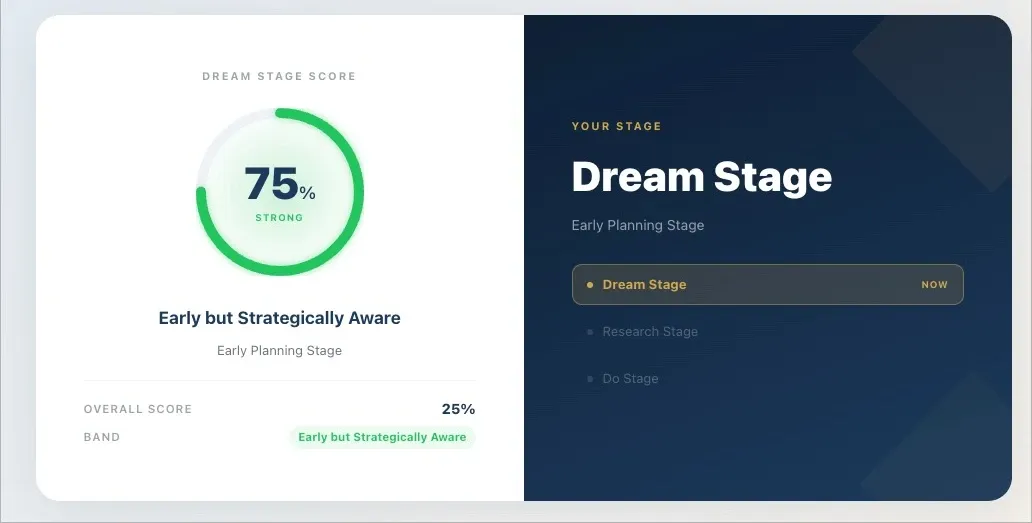 View full-size screenshot (opens in a new tab)
A results page for a homeowner in the early planning stage. The score fills in as an animated circle.
How did the agent use the quiz answers?
When our client called a lead, he already knew their selling timeline, their situation and the important details about their property.
He didn’t start from zero. He went straight to what mattered to that seller.
Speed matters too. A homeowner who just finished the quiz is at their most interested. If your team can’t call within minutes, an AI voice agent for real estate can call them back first, with their answers in hand.
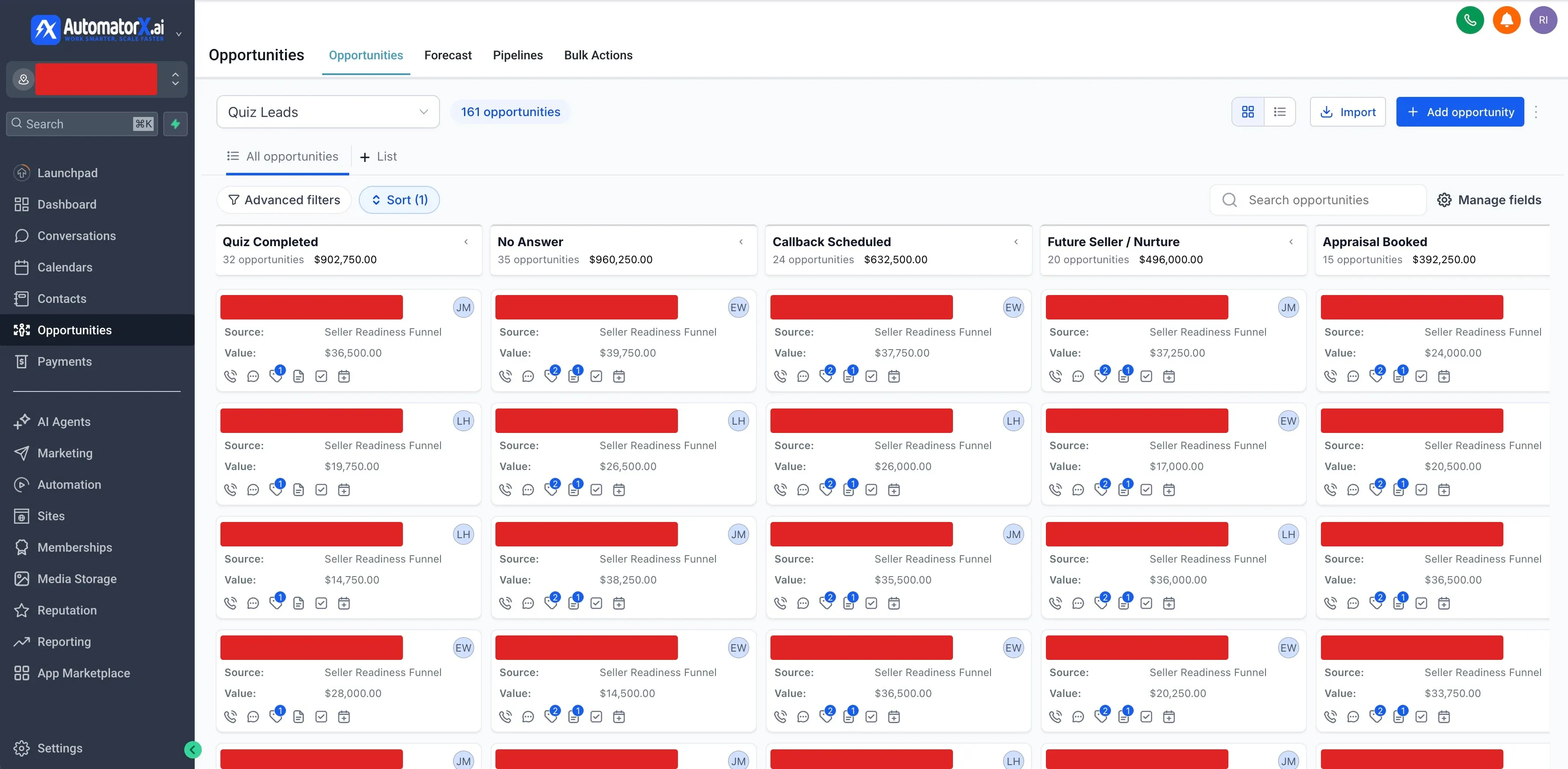
We also set up a dedicated pipeline in HighLevel for the quiz leads, with stages for callbacks, future sellers, appraisal bookings and other follow up. So far, 15 of those leads have booked an appraisal. If you’re still tracking leads in a spreadsheet, here’s how to tell when it’s time for a CRM.
 View full-size screenshot (opens in a new tab)
The Quiz Leads pipeline in HighLevel: 161 opportunities, each tagged with its source and assigned to an agent. Lead names are hidden for privacy.
Lead quality is about more than contact details. The more you know about a homeowner before the first call, the better that call goes.
Why did we build our own quiz app?
HighLevel was the right place to start. It got the quiz live fast and proved the idea worked.
But some homeowners spent up to 20 minutes on it. That’s a long time. I wanted to make it easier to finish, show people why each question mattered, and give them value along the way, not only at the end.
So we built our own quiz app.
What makes a long quiz easier to finish?
A progress bar. Homeowners can see how far they’ve come and how much is left, instead of wondering when the questions will end.
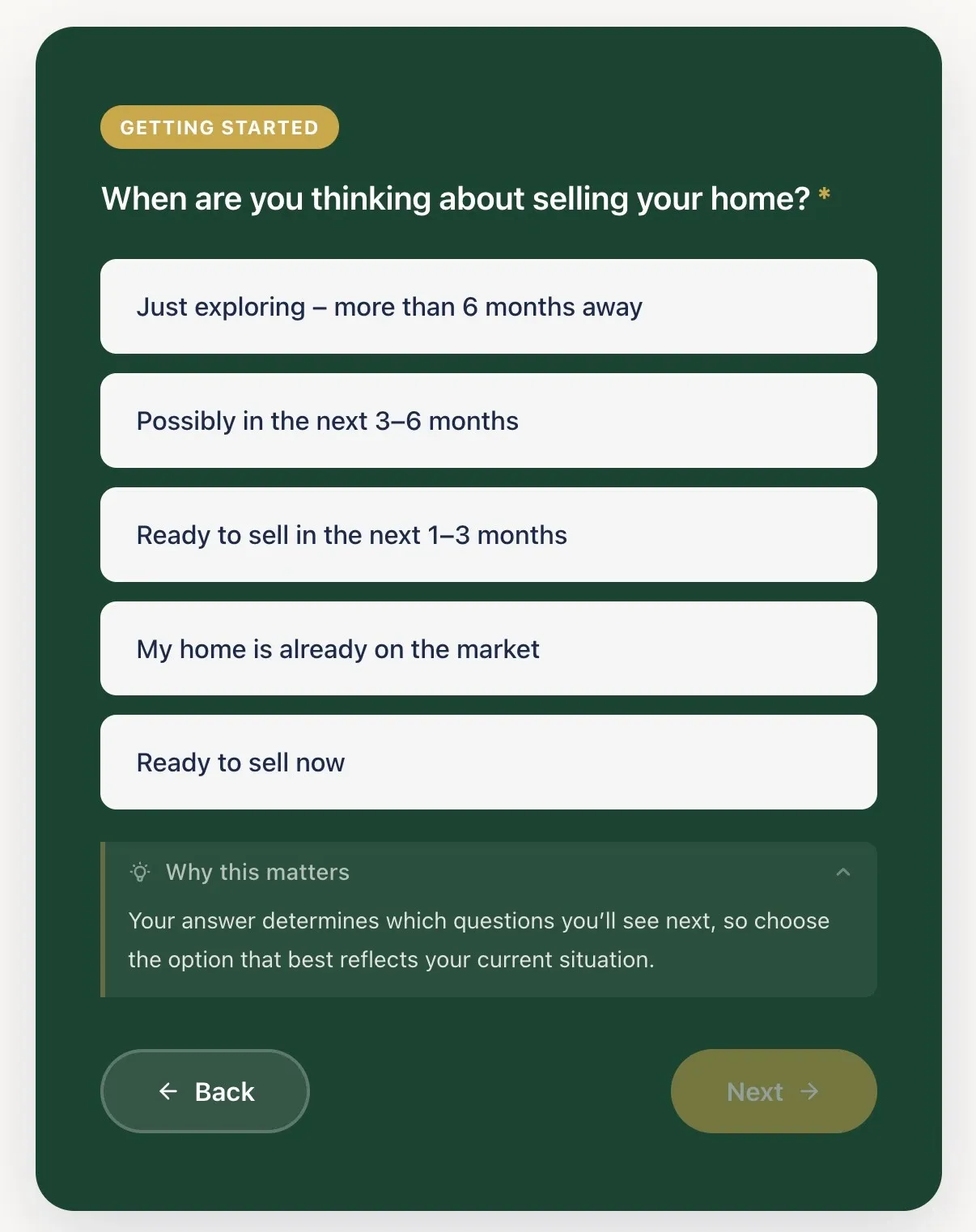
“Why this matters.” This is my favorite feature. Homeowners can tap “Why this matters” on a question to see why we’re asking and how it affects their sale. It turns a form field into something worth answering.
Insight cards. Between questions, homeowners see short insights triggered by their own answers. They get something useful during the quiz instead of waiting until the end, which gives them another reason to keep going.
Results built around their stage. The final page shows their readiness stage, a personalized score, the value they could unlock, and recommended next steps for where they are.
 View full-size screenshot (opens in a new tab)
The first question in our custom quiz app, with the “Why this matters” note open.
What does the quiz analytics dashboard track?
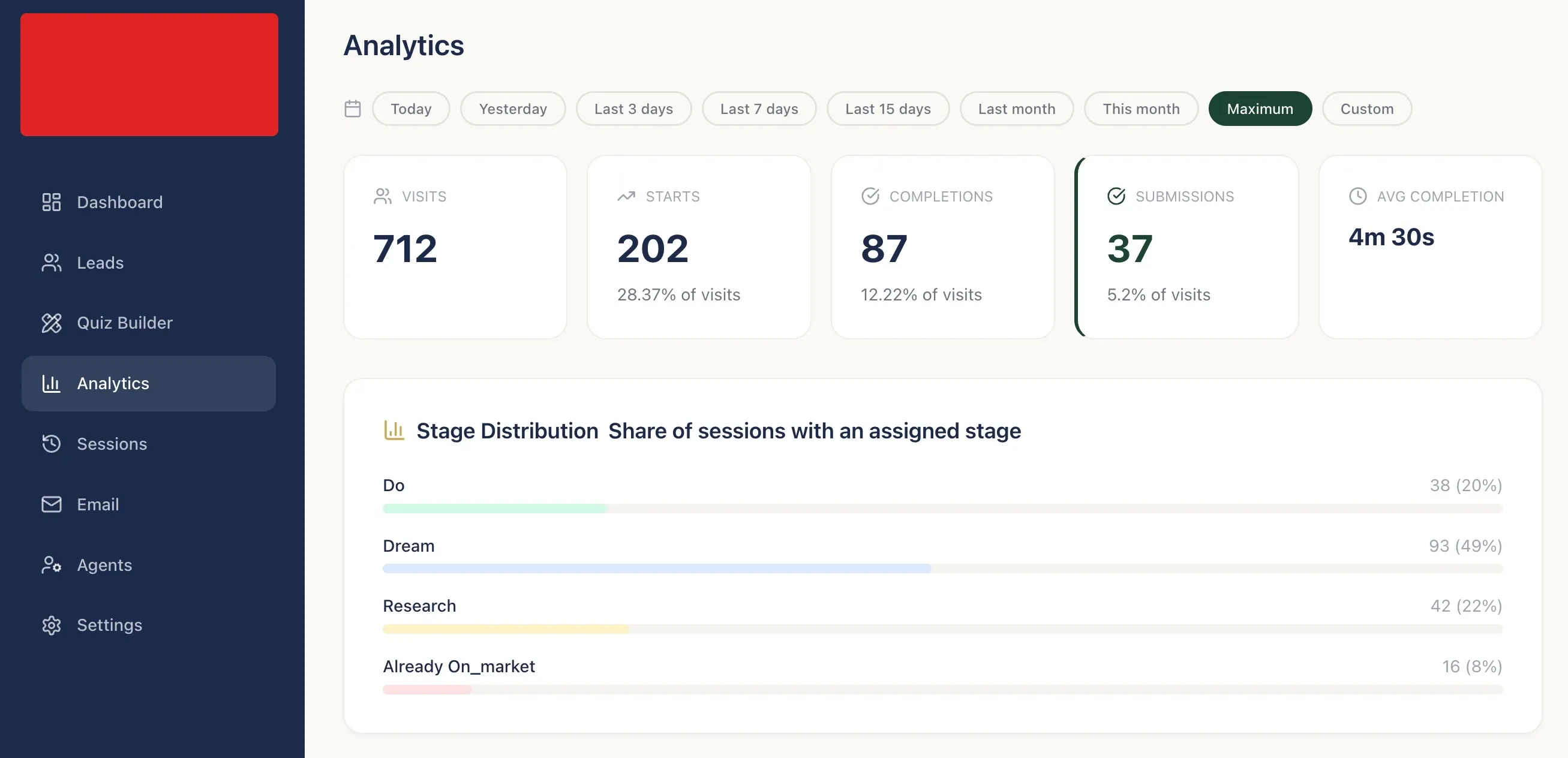
We also wanted to see exactly how people move through the quiz. The dashboard tracks:
- Visits: how many times the quiz was opened
- Starts: how many people began answering
- Completions: how many finished the questions
- Submissions: how many entered their details
- Average completion time: how long the quiz takes
- Drop-off by question: which question people leave on
- Sessions: each visitor’s path through the quiz
 View full-size screenshot (opens in a new tab)
The custom app’s admin dashboard, with the analytics page open: visits, starts, completions, submissions, average completion time and how sessions split across selling stages. The client’s logo is hidden.
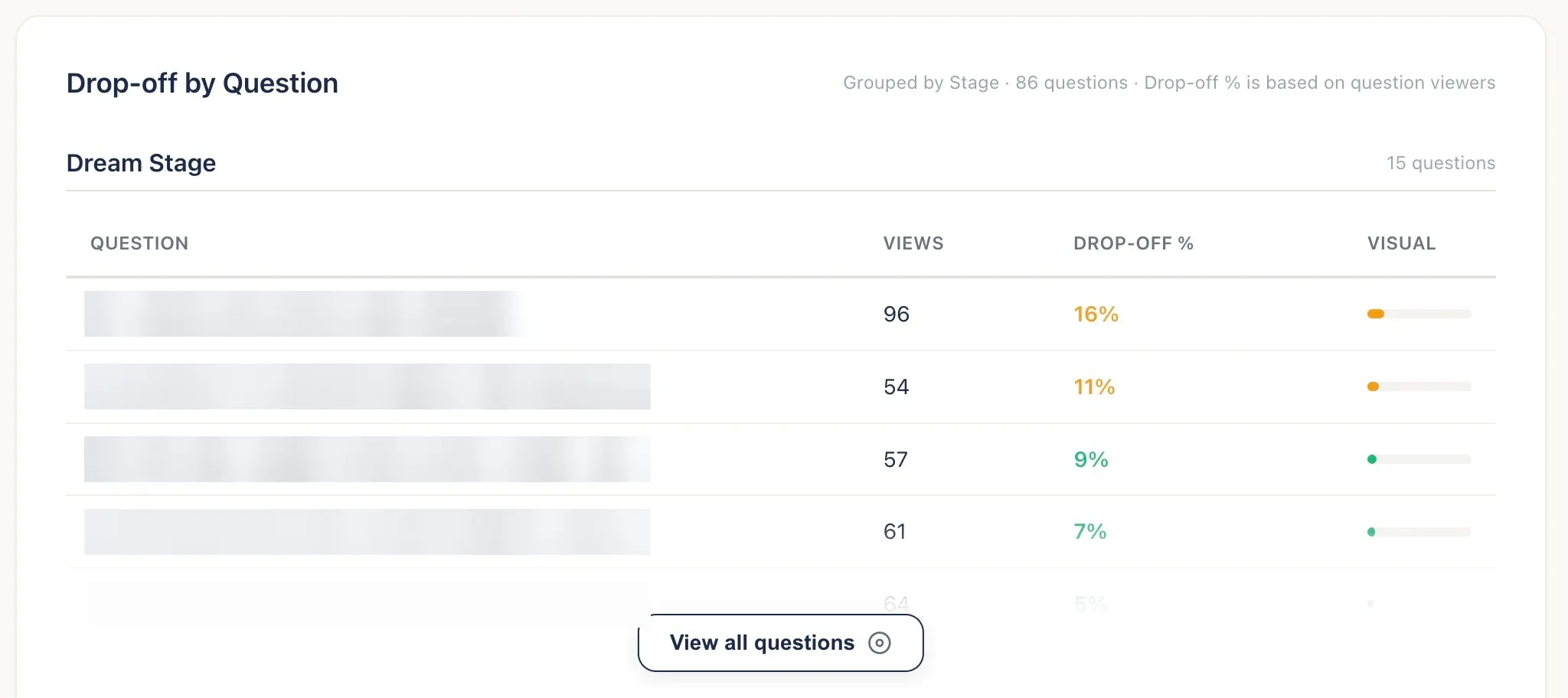
Drop-off by question is the most useful one. If many people leave at the same question, we can find out why. Maybe it’s confusing, too personal, or asked too early. Then we fix it.
 View full-size screenshot (opens in a new tab)
Drop-off by question for one stage. The highest drop-off questions are the first ones we review.
The app also assigns each new lead to the next available agent in a round robin and sends every lead into HighLevel, so the agent’s follow up works the same way as before.
Building your own tool isn’t always worth it. I explain when it is in custom automation or an off the shelf CRM. Here it made sense, because every small improvement to the quiz affects every lead.
Across both versions, the campaign brought in 160+ seller leads at about $18 each, and every one of them landed in the same HighLevel pipeline.
What did we learn from this campaign?
A shorter form isn’t always better. More questions can bring you better leads, as long as every question is useful and people get something valuable back.
Three more lessons:
- The ad and the quiz have to match. The promise that gets the click has to be the experience people get.
- Different sellers need different questions. Split the quiz by stage so nobody answers questions that don’t apply to them.
- The results page deserves real effort. It’s your first chance to give value and build trust before the sales call.
One warning: a great quiz won’t help if leads wait days for a call. Set up automated lead follow up first. If you want the full system built for you, see our lead generation systems.
FAQ
What is a real estate seller quiz funnel?
It’s a lead generation system that sends homeowners from an ad to a quiz about their property and selling plans. The agent gets their timeline and situation before the first call, and the homeowner gets personalized feedback in return.
How much did the seller leads cost?
About $18 per lead, down from $87 on the agent’s previous lead magnet campaign. Over two months the campaign spent about $2,900 on Meta ads and brought in 160+ seller leads. All figures are in US dollars.
What was the quiz conversion rate?
About 5% of landing page visitors completed the quiz and submitted their details, even though the quiz took 2 to 20 minutes to finish.
How many questions should a real estate seller quiz have?
There’s no perfect number. Ours asked 7 to 40 questions depending on the homeowner’s selling timeline. Ask only what helps the agent and gives the homeowner something to think about, and split the quiz by stage so nobody sees questions that don’t apply to them.
Can you build a real estate seller quiz in HighLevel?
Yes. We built the first version with HighLevel’s Survey Builder, using conditional logic to show different questions by selling timeline and send people to different results pages. HighLevel’s Quiz Builder also supports scoring and score-based results now.
Do longer quizzes generate better leads?
Not automatically. A longer quiz collects more detail and filters out people who aren’t serious, but it also loses people who would have filled in a short form. It only works when every question is useful and the results are worth the time.
Why did AutomatorX.ai build its own quiz app?
HighLevel proved the idea. We built our own app to make a long quiz easier to finish and to see where people drop off. It adds a progress bar, “Why this matters” notes that explain the questions, insight cards based on the homeowner’s answers, results by selling stage, question-level drop-off tracking and round-robin agent assignment. Every lead still goes into HighLevel.
Free 30-minute strategy call
Want a quiz funnel like this for your business?
We will look at your ads, your current lead form and how leads reach your CRM, then show you how a quiz built around your market and your sales process could work. If it is not a fit, you still leave with a clear plan.
Book a Free Strategy Call