Workflow Automation
Do You Need a CRM Yet? How to Tell When Your Lead Spreadsheet Has Stopped Working
When a spreadsheet is enough for tracking leads, the signs it has stopped working, the columns it needs, and what to look for in a first CRM so you don't abandon it.


On this page
The short answer
You probably don’t need a CRM yet if one person handles your leads, you have fewer than about 20 open at a time, and every lead has an owner, a next action and a date. You do need one when several people share the same leads, when duplicates and “whose lead was this?” questions pile up, or when follow-ups still slip after you’ve added those columns. If they slip because nobody fills in the next step, fix that habit first, because a CRM won’t.
Is a spreadsheet enough to track leads?
Yes, if one person can check the open leads each morning and act on what’s due. I’d use about 20 open leads as a starting guideline, not a limit: a few complicated quotes can take more attention than dozens of simple enquiries.
A name, number and status don’t tell you what to do next. Add an owner and a dated action, then make the daily check someone’s responsibility. If you want to compare approaches, this Reddit discussion on tracking leads after they come in covers the spreadsheet-versus-CRM decision.
What columns does a lead spreadsheet need?
It needs an owner, a next action, a next action date, a source, a status and a lost reason, plus the contact details. Here’s the layout I’d start with. Copy this header row into row 1 of a tab called Leads, then use Data > Split text to columns with | as the separator. Trim spaces around the headings:
Date in | Name | Phone | Email | Source | What they want | Owner | Status | Last contact | Next action | Next action date | Value | Lost reason | Notes| Column | Example | Why it’s there |
|---|---|---|
| A. Date in | 2026-10-20 | Shows how long leads wait |
| B. Name | Sarah Lee | |
| C. Phone | 555 0182 | One format, so you can spot duplicates |
| D. Email | sarah@example.com | |
| E. Source | Google, referral, Facebook | Tells you where good leads come from |
| F. What they want | Bathroom regrout, quote | |
| G. Owner | Dave | One name, never “us” |
| H. Status | New, Contacted, Quote sent, Waiting on customer, Won, Lost | Use a dropdown so nobody invents new ones |
| I. Last contact | 2026-10-21 | |
| J. Next action | Call to confirm Thursday visit | A verb and a thing, not “follow up” |
| K. Next action date | 2026-10-23 | The column that drives everything |
| L. Value | 1,800 | Optional, rough is fine |
| M. Lost reason | Price, went with someone else, no reply, timing, not a fit | Fill it in when a lead is lost |
| N. Notes | Has photos, wants weekend work |
Three rules make it work:
- A lead can’t be open without an owner and a next action date. If there’s no next step, mark it Won or Lost.
- Every call or message ends with you filling in columns I, J and K before you put the phone down.
- Someone checks the “due today” list every morning and handles or reschedules each action.
For the “due today” list in Google Sheets, make a second tab and paste this in cell A1:
=FILTER(Leads!A2:N, Leads!K2:K<>"", Leads!K2:K<=TODAY(), Leads!H2:H<>"Won", Leads!H2:H<>"Lost")It shows every open lead with a next action due today or earlier. Google documents the FILTER function and how to make the Status column an in-cell dropdown if you want to adapt either one. When nothing is due you’ll see a “no matches” error, which is the good outcome. A third tab with this formula shows named, open leads with no next action date:
=FILTER(Leads!A2:N, Leads!B2:B<>"", Leads!K2:K="", Leads!H2:H<>"Won", Leads!H2:H<>"Lost")Use real date values in K, not dates stored as text, and the exact status values Won and Lost without extra spaces. Some locales require semicolons instead of commas between arguments. The second formula assumes every lead has a name in B; it checks for a missing date, not a missing owner or action description. Review G and J too.
Record a lost reason when you know it; use “unknown” rather than guessing. Review these reasons alongside overdue actions before deciding what to change.
How do you know a spreadsheet has stopped working?
You know when follow-ups slip even though the columns are there, or when you can’t tell who owns a lead without asking around. These are the signs I’d watch for:
- A second or third person starts editing the same tab. Headcount matters less than this. Rows get overwritten, someone sorts one column without the rest, and nobody is sure who called back.
- Dated next actions get missed anyway. A sheet can’t tap anyone on the shoulder. If the morning check gets skipped on a busy day, the sheet records the miss and that’s all it does.
- The same customer shows up as “Sarah Lee”, “S Lee” and a phone number with no name.
- Working out whose lead went cold turns into detective work through texts and inboxes.
- Formulas break because someone pasted over them, and fixing the sheet becomes a weekly job.
If these recur, compare the effort of maintaining the sheet with testing a CRM.
Spreadsheet or CRM: which one fits?
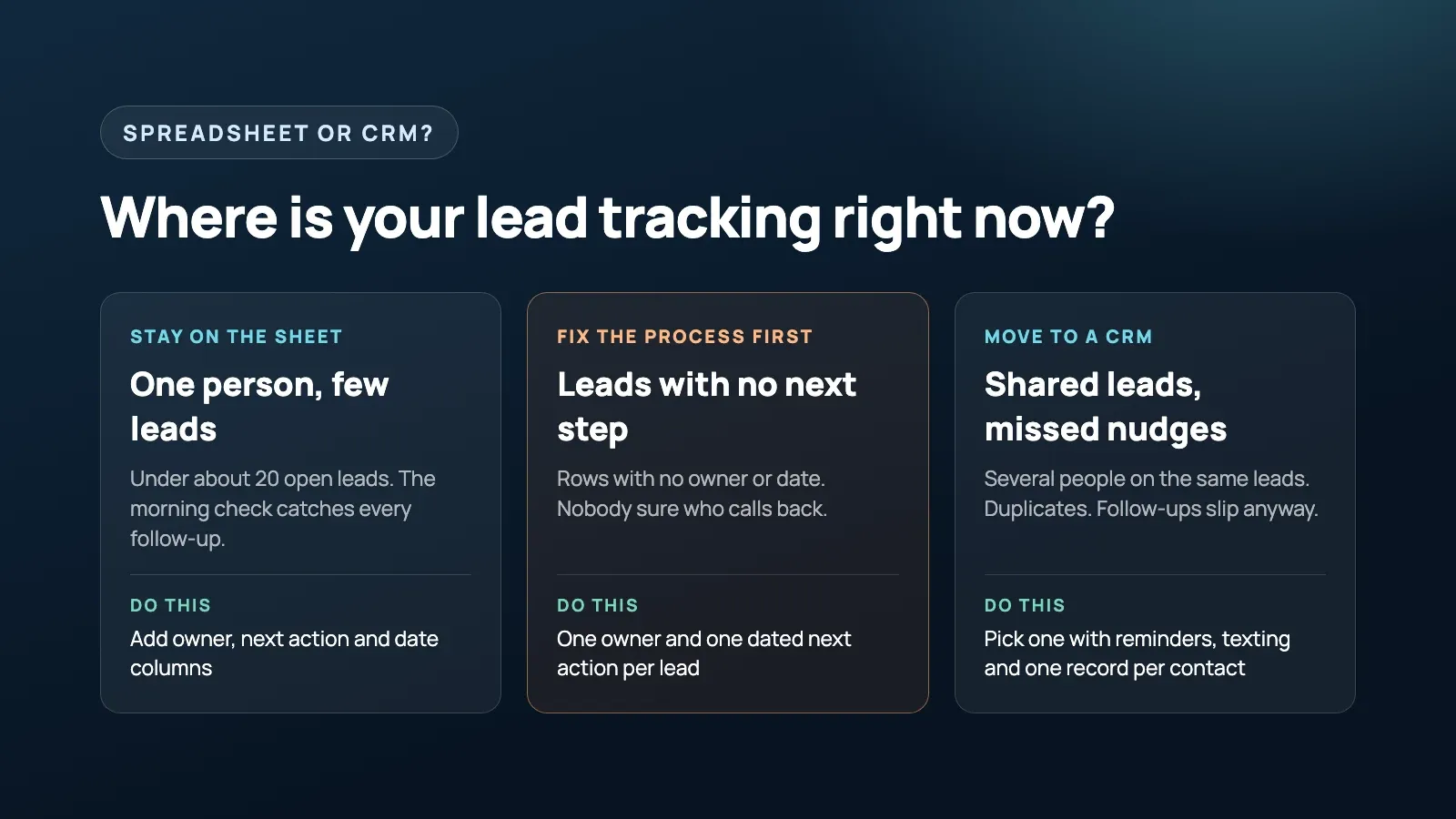
Stay on the sheet if the middle column describes your needs. A shared-history or reminder requirement can justify a CRM even at low volume.
| Question | Stay on a spreadsheet | Time for a CRM |
|---|---|---|
| Who handles leads? | One person | Two or more people work the same leads |
| How many are open at once? | Under about 20 | More than you can check in ten minutes |
| Are follow-ups getting missed? | Rarely, the morning check catches them | Yes, even with a next action date on every row |
| Duplicates? | Rare and easy to spot | Same customer entered several ways |
| Who owns a lead? | Obvious | Takes asking around to find out |
| Texting customers | From your own phone is fine | You want texts sent automatically and saved on the customer’s record |
| Reporting | A rough count once a month is enough | You want source and win rate without rebuilding it by hand |
Are most CRM problems actually process problems?
Unclear ownership and missing next steps need a process fix before a software purchase. For each enquiry source, agree where it gets recorded, who owns the reply and when that reply is due.
I’d run the sheet with those rules for two weeks. When something slips, record why. Blank next-action fields mean the team needs to change how it updates records. Correctly recorded tasks that nobody notices suggest you need reminders or escalation.
Several people sharing leads can justify a CRM sooner. Don’t wait for a particular lead count if you already need a shared conversation history and reliable handoffs.
Why do owners set up a CRM and then stop using it?
A CRM is easy to abandon when updating it takes longer than writing a note on your phone. I’d start with the sheet’s fields and a short pipeline, rather than turn on every feature.
During a trial, have the person who answers enquiries update a record from their phone. They should be able to log the conversation and schedule the next action without hunting through menus. Remove required fields that serve no immediate purpose.
Agree when updates happen, too: after the conversation, while the details are fresh. Hiring someone to tidy records later won’t recover a next step nobody wrote down.
What should you look for in a first CRM?
Look for assigned reminders, a shared contact history and quick updates from a phone. I’d test these with sample enquiries before importing real customer data:
- Set a task and check that the named person receives a notification without opening the CRM.
- Enter the same phone number twice and check how duplicates are handled.
- Rename the pipeline stages to match your process.
- Log a call outcome and next step from your phone.
- Check that sent texts and replies appear on the contact record. Our automated lead follow-up guide covers message examples and US A2P 10DLC registration rules.
- Submit a website form and check that it creates a lead with an owner.
- Test user permissions, then export contacts, notes and activity history. Don’t assume an export includes everything.
For Only Wood Floors, a California flooring business, we built text follow-up that asks each new lead for project photos, keeps following up until they arrive, then alerts the team. It uses native HighLevel workflows. At the time HighLevel had no built-in trigger for incoming picture messages, so we built a workaround. That’s a specific reason to use workflows beyond a sheet; you don’t need that setup just to store phone numbers.
HubSpot’s free tier is one starting option. As of October 2026, HubSpot says the free CRM tools cover up to two users and 1,000 contacts, so a team that’s outgrowing a shared sheet may outgrow the free plan quickly too. Check the current limits against your requirements rather than assuming every feature you tried is included free.
Also check the software you already use. Job management software may have an adequate lead board. If you need waivers, recurring billing and class scheduling, evaluate booking or membership software before adding a separate CRM.
How do you move from a spreadsheet to a CRM?
I’d move open leads first and keep the old sheet as a read-only archive. Clean duplicate contacts, confirm owners and give every open lead a dated next action before importing.
Map status to pipeline stage and next action to an assigned task. Test a small import first, including notes and dates, then check the records from a phone. Pick a switchover day so new enquiries don’t end up split between two systems.
For the first two weeks, check overdue tasks and unassigned leads each morning. Fix missing reminders or confusing fields before adding more automation.
Should you build your own tracker instead?
Only if an important rule doesn’t fit existing tools and someone will maintain the tracker. I build custom software, but I wouldn’t recommend it for a standard enquiry, quote and follow-up process.
Scripts attached to a sheet need documentation, access controls and someone responsible when they break. Compare that maintenance work with configuring a CRM before you build.
FAQ
Do I need a CRM for a small business?
Not always. If one person handles leads, you have fewer than about 20 open at once, and someone checks the list every morning, a spreadsheet with an owner, a next action and a due date on every lead is enough. Move to a CRM when several people share leads or follow-ups still slip with those rules in place.
What columns should a lead tracking spreadsheet have?
At minimum: date received, name, phone, source, what they want, owner, status, last contact, next action, next action date and lost reason. Owner and next action date matter most, because without them the sheet only records what happened.
When should you switch from a spreadsheet to a CRM?
Switch when two or more people work the same leads, when you find the same customer entered several ways, when nobody can say who owns a lead without asking around, or when follow-ups are missed even though every row has a dated next action.
Why do small businesses stop using their CRM?
Usually because it was set up with too many fields, it is slow to update from a phone, or nobody agreed that every conversation ends with a next action and a date. The software gets blamed, but the habit was never there.
What should I look for in a first CRM?
Reminders that fire on their own and land on one named person, one record per contact, a simple pipeline with your own stages, quick updates from a phone, texting that is logged on the contact, and an easy way to export your data if you leave.
Final thought
Whether your leads live in a sheet or a CRM, the test I’d use is whether you can say, right now, who owns every open lead and what’s due today. I’d still rather see a growing team on a CRM than on a shared spreadsheet. I’d just buy it after the process is agreed, so the tool has something to enforce.
If you want help setting up lead tracking and follow-up inside the CRM you have, or picking a first one that fits how your team works, see how we approach workflow automation.
Free 30-minute strategy call
Want this working in your business?
Show us where time, leads, or money are leaking. We will map the simplest system that fixes it. If we are not a fit, you still leave with a clearer plan.
Book a Free Strategy Call